

Payment method control is an important part of checkout validation for Shopify merchants.
For wholesalers, distributors, B2B merchants, regulated sellers, and high-value stores, not every payment option should be available for every order. COD, BNPL, invoice terms, PayPal, or other payment methods may need to be restricted based on cart value, buyer eligibility, product type, region, or business policy.
But if checkout allows the wrong payment method, your team has to fix the issue after the order is already placed.
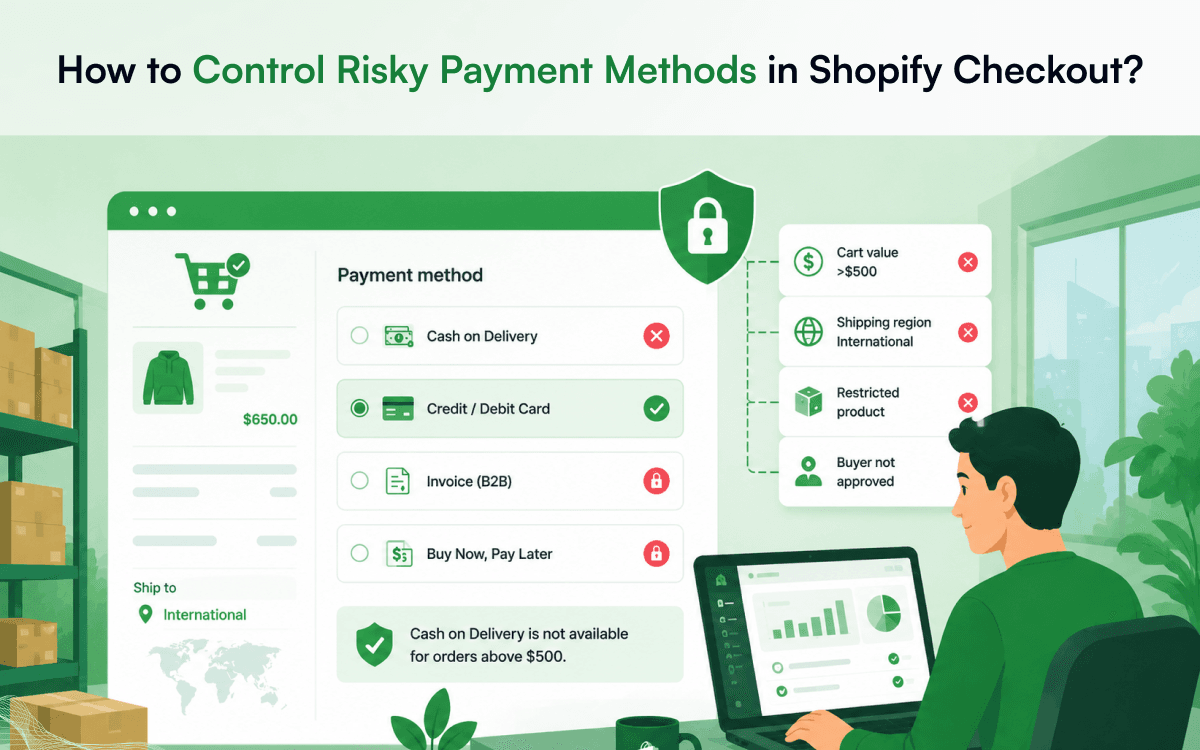
The Problem
Many Shopify stores show the same payment options to every customer. That can create avoidable order issues.
Common examples include:
- COD used for high-value orders
- Invoice terms used by unapproved buyers
- BNPL used for restricted or sensitive products
- Payment methods shown in unsupported regions
- Wholesale buyers using payment methods that do not match account terms
- Risky payment methods used on orders that require review
The customer completes checkout first. Then the merchant has to decide what to do next.
Why It Happens
Shopify checkout is built to help customers complete payment. But many merchants need payment rules that depend on the order context.
For example:
- A store may want to allow COD for small domestic orders but disable it for high-value or international orders.
- A B2B store may want to show invoice payment only to approved wholesale buyers.
- A regulated product seller may want to restrict BNPL or certain gateways for specific product categories.
If payment rules are not enforced during checkout, the wrong payment method can still be used.
The Consequences
Wrong payment choices create extra work. Your team may need to:
- Review the order manually
- Contact the customer
- Change payment instructions
- Hold fulfillment
- Cancel or refund the order
- Handle payment disputes
- Create support tickets
This slows down operations and creates a poor customer experience.
A customer should not complete checkout and then be told the selected payment method cannot be accepted. The restriction should happen before the order is placed.
The Better Approach
Payment rules should be enforced during checkout.
- If COD is not allowed above a certain order value, it should not appear.
- If invoice terms are only for approved buyers, they should be restricted.
- If BNPL is not allowed for certain products, checkout should hide it when those products are in the cart.
- If a payment method is not supported for a region, the customer should not see it.
This keeps checkout aligned with store policy and reduces manual review.
How CartWisp Helps
CartWisp helps Shopify merchants enforce checkout rules before orders are placed.
For payment control, CartWisp can help merchants restrict payment methods based on:
- Cart value
- Product type
- Buyer eligibility
- Customer tags
- B2B or wholesale status
- Shipping region
- Order risk conditions
- Store policy
Instead of reviewing payment issues after checkout, merchants can prevent risky payment choices before the order is accepted.
Example:
“Cash on Delivery is not available for orders above $500. Please choose another payment method.”
Or:
“Invoice payment is available only for approved B2B buyers.”
That is clearer for the customer and easier for the operations team.
Final Thought
If your team is still reviewing payment methods after checkout, the issue is not just payment processing. It is checkout control.
For Shopify wholesalers, distributors, B2B merchants, and risk-sensitive stores, payment method rules should be enforced before orders are placed.
CartWisp helps merchants prevent risky payment choices from becoming manual review problems.
Book a Demo to see it in action: https://cartwisp.com/demo
Install CartWisp on Shopify: https://apps.shopify.com/cartwisp
#CheckoutValidation #CheckoutControl #CheckoutRules #CheckoutPolicy #CheckoutGovernance #InvalidOrders #OrderValidation #PolicyEnforcement #ShopifyCheckout #ShopifyCheckoutRules #WholesaleEcommerce #ShopifyB2B